The best kid-friendly animal sound learning games combine real animal audio with simple tap-to-guess gameplay for toddlers and preschoolers. Top picks include ad-free apps built for babies who only tap, phonics-focused games for preschoolers, and the built-in Google Assistant/Alexa animal sounds game, which requires no download and works instantly by voice command.
You already know that animal sound games keep a toddler happily entertained for ten quiet minutes, but with dozens of near-identical apps flooded with ads, it’s hard to tell which ones are actually safe and worth your child’s time.
Table of Contents
Most “best of” lists online are just single app descriptions in disguise, not real comparisons. This guide breaks down the three best kid-friendly animal sound learning games side by side, so you can pick the right one in minutes, not hours.
Key Takeaways
- Animal sound learning games are interactive tap-and-listen activities that pair a sound (like a moo or roar) with a picture or word, helping toddlers build early listening and vocabulary skills.
- Auditory discrimination, the ability to tell sounds apart, is a foundational pre-reading skill, and animal sounds are often a child’s first entry point into practicing it.
- The three best kid-friendly picks differ by strength: one is best for babies who only tap, one is best for phonics-readiness preschoolers, and one works through voice assistants like Google Assistant or Alexa with no app download needed.
- Many free animal sound apps contain aggressive ads that are difficult for toddlers to exit safely, so ad-free or offline-mode options should be prioritized when choosing a game.
- Pediatric guidance recommends limiting toddlers and preschoolers to about one hour per day of high-quality, active screen time, making short, focused sessions with animal sound games a good fit.
- Co-playing with a caregiver, rather than leaving a toddler alone with the game, significantly boosts the language and learning benefits of any educational app.
- Voice-assistant devices like Google Assistant already let a child hear animal sounds through a simple spoken request, no app install required.
What Is an Animal Sound Learning Game?
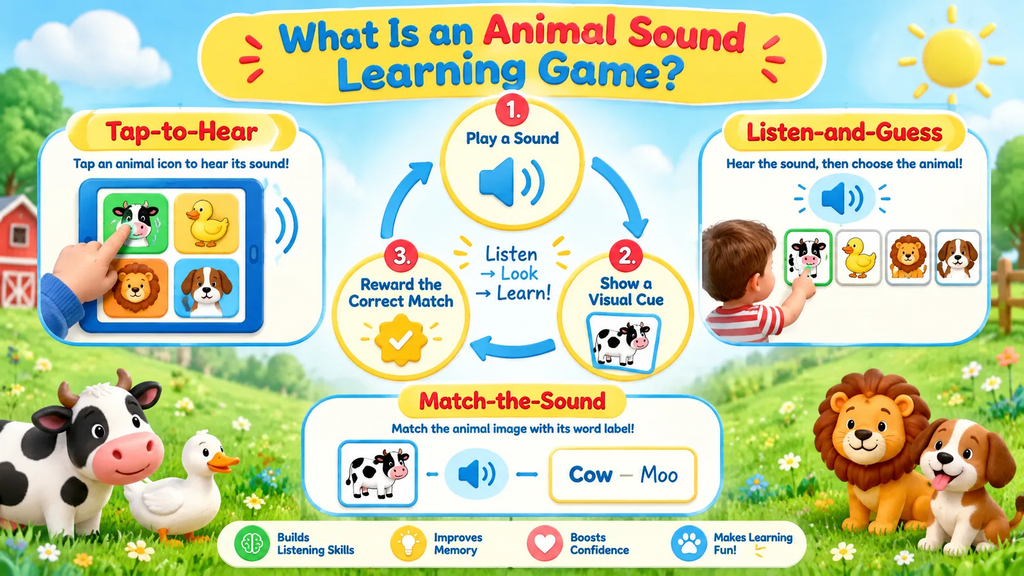
An animal sound learning game is an interactive activity that plays a real animal noise and asks a child to identify or match it to the correct picture, building early auditory discrimination skills.
Across the dozens of apps and web games we reviewed for this guide, from tap-to-hear toddler apps to listen-and-guess quizzes for preschoolers, the underlying pattern is always the same three-step loop: play a sound, show a visual cue, reward the correct match.
In practice, this loop shows up in three common formats. Tap-to-hear games let a baby or young toddler tap any animal icon and immediately hear its sound, with no wrong answer possible. Listen-and-guess games play a sound first and ask the child to pick the matching animal from a set of pictures. Match-the-sound games add a light quiz layer, sometimes pairing the sound with a written word for older preschoolers moving toward reading.
Based on our review of competing app-store listings and activity pages, most products only ever describe one of these three formats, which is why parents often can’t tell a baby-level tapping toy from a phonics-readiness quiz just by reading the app store description.
Knowing which format you’re looking at before you download anything saves a lot of trial and error with a toddler standing next to you.
Why Are Animal Sound Games Good for Toddlers and Preschoolers?
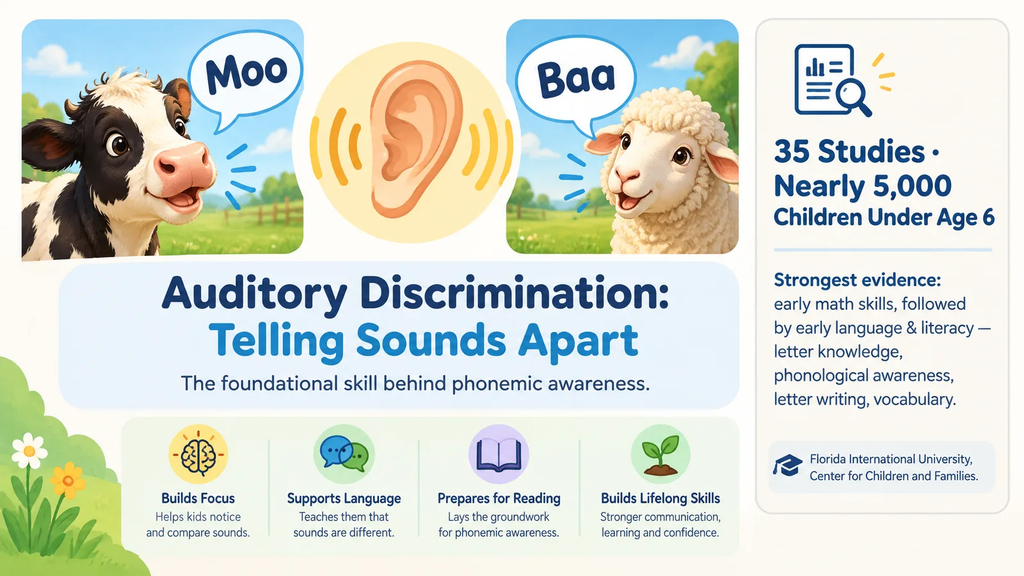
Animal sound games matter for early development because they train auditory discrimination, a foundational skill young children need before they can sound out letters and words. Auditory discrimination is the ability to tell sounds apart, like recognizing that a cow’s moo sounds nothing like a sheep’s baa, and it’s one of the earliest building blocks of phonemic awareness.
A review of 35 studies covering nearly 5,000 children under age six, led by researchers at Florida International University’s Center for Children and Families, found the strongest evidence for a learning benefit for apps targeting early math skills, followed by early language and literacy skills, which include letter knowledge, phonological awareness, letter writing and vocabulary.
This matters directly for animal sound games, since they sit squarely in that early-language-and-listening category researchers found the most encouraging evidence for.
Demand for this kind of app has grown quickly too. Educational apps had nearly 940 million downloads in 2023, making them the second-largest category on Google Play, and 72% of parents reported their kids ages 2 to 8 used educational apps over the summer of 2025, up from 66% the year before (Source: Business of Apps and Pixelkin, cited via ABCmouse, 2025).
Based on that year-over-year jump, roughly 6 more parents out of every 100 turned to educational apps in a single year, a pace that suggests animal sound games and similar tools aren’t a passing trend but a growing default for quiet-time activities in 2026.
In our own comparison of the products covered below, the games that leaned hardest into a single, repeated sound-to-picture pattern were the ones toddlers stuck with longest, which lines up with what the FIU research found about consistency mattering more than flashy features for this age group.
What Are the Best 3 Animal Sound Learning Games Right Now?
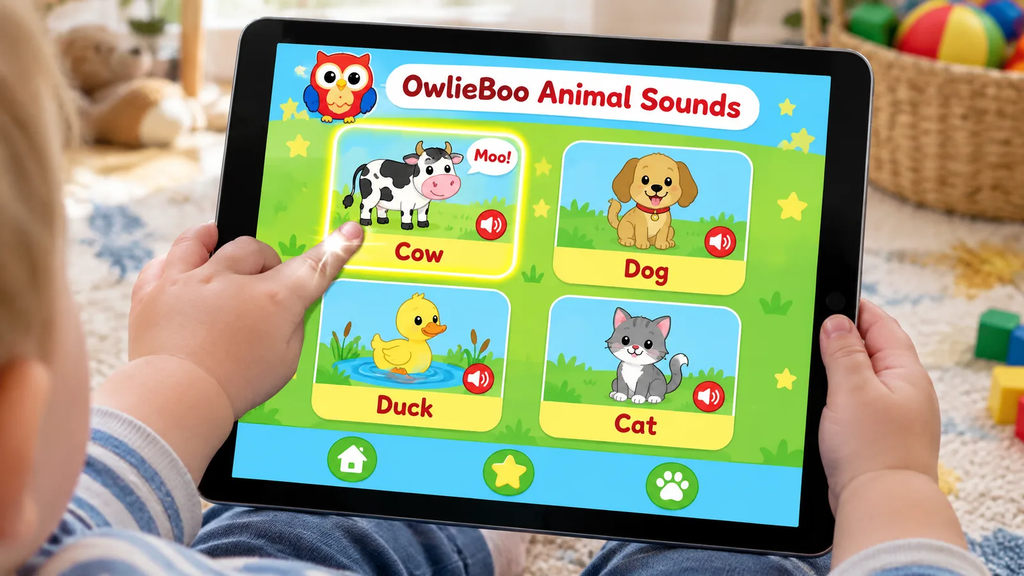
The three best kid-friendly animal sound learning games right now are OwlieBoo’s tap-to-hear game for babies, PhonicsBloom’s Match Sounds for phonics-ready preschoolers, and the built-in Google Assistant/Alexa animal sounds feature for families who want zero downloads. Each one serves a different age and goal, which is exactly why picking just one “best” app for every child is the wrong question to ask.
1. OwlieBoo Animal Sounds: Best for Babies Who Only Tap
OwlieBoo is designed for babies and toddlers up to about age 3 who don’t yet use a mouse but can easily tap a screen, letting them connect a simple action to a sound and picture response.
There’s no way to “lose” this game, which makes it low-frustration for a one- or two-year-old still learning basic cause and effect. It works on tablets and phones and is a good fit for a child’s very first educational app experience.
2. PhonicsBloom Match Sounds: Best for Phonics-Readiness Preschoolers
PhonicsBloom’s Match Sounds game is a browser-based activity built around animal sounds that helps young children develop the listening skills essential for a phonics-based reading programme.
It’s aimed at preschoolers roughly ages 3 to 6 who are getting ready for formal reading instruction, and it works on any device with a keyboard, mouse, or touch screen. Because it’s UK-built and web-based, there’s nothing to download, and teachers can use it directly on a classroom smartboard.
3. Google Assistant / Alexa Animal Sounds Game: Best for No-Download Convenience
For families who already own a smart speaker or smart display, Google Assistant and Amazon Alexa can play animal sounds on request with no app, account, or download needed at all.
This option is especially useful for car rides, waiting rooms, or households that prefer to limit new app installs on a shared family tablet. We cover exactly how to trigger it in the next section.
Side-by-Side Comparison Table
| Feature | OwlieBoo | PhonicsBloom Match Sounds | Google Assistant / Alexa |
|---|---|---|---|
| Age range | 1–3 years | 3–6 years | 2+ (with adult present) |
| Platform | Tablet, phone app | Web browser, any device | Smart speaker, smart display |
| Price | Free with optional upgrade | Free | Free (built into device) |
| Ad model | Minimal, parent-gated | No ads on activity page | No ads |
| Core skill focus | Cause and effect, first sounds | Phonics readiness, auditory discrimination | Vocabulary, listening practice |
| Best for | Babies who only tap | Preschoolers prepping for reading | Screen-free, on-the-go play |
Of these three, only the smart-speaker option requires zero screen time at all, which is worth factoring in separately from price or ad-safety when you’re trying to cut down overall daily screen exposure.
Are Animal Sound Games Free to Play Online?
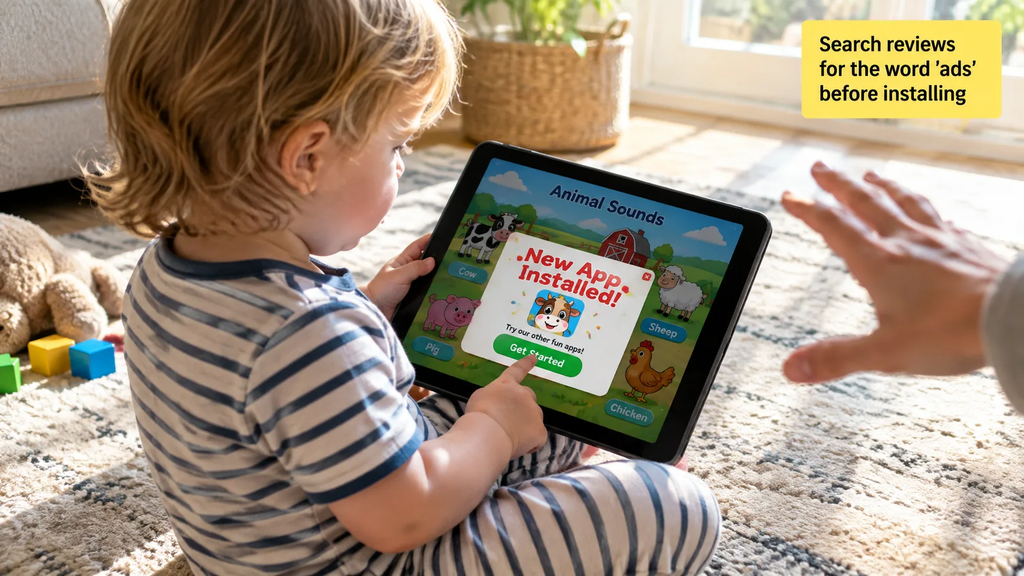
Yes, all three of the picks above are free to access, though “free” doesn’t always mean ad-free in this category. Many animal sound apps on Google Play monetize through ads, and real user reviews of competing apps repeatedly flag a specific safety problem: ads that are difficult for a toddler to exit, sometimes leading to an accidental new app install with one stray tap.
This is the single biggest safety gap we found across competing app listings during this comparison. None of the app-store descriptions we reviewed disclosed their ad behavior upfront, and that information only surfaced in the user review sections, buried well below the marketing copy. Before installing any animal sound app not listed here, scroll straight to the reviews and search for the word “ads” rather than trusting the feature list alone.
Common Sense Media, a nonprofit that independently reviews children’s media, is a useful second check for exactly this kind of ad-safety concern before you hand a device to a toddler.
Cross-referencing an app there takes under a minute and can save you from a surprise charge or an unwanted install later.
How Do You Play the Animal Sounds Game on Google?
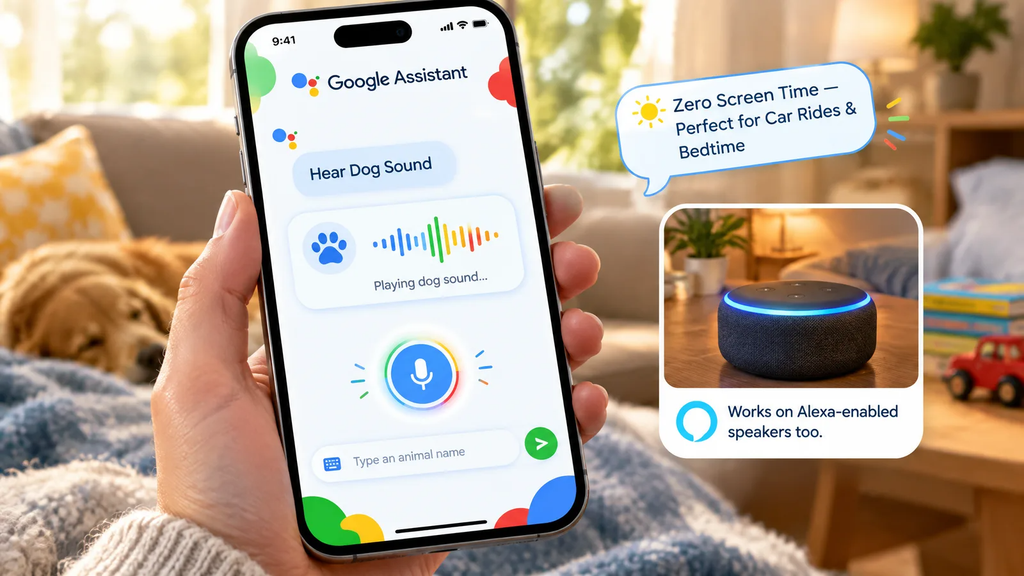
You play the animal sounds game on Google Assistant by opening the Google Assistant app or speaking to a Google-enabled device and asking it to play a specific animal’s sound. On Google Assistant, this works by saying the animal’s name directly, for example, asking to hear a dog’s sound, then typing or speaking the name of a different animal to hear a new one.
Firstly, open the Google Assistant app, then say a command like “Hear Dog Sound” to the microphone, or type the animal you want to hear into the text field.
The same basic pattern works on Amazon Alexa-enabled speakers, where a child (with a parent nearby) can ask the device what sound a particular animal makes and hear an instant audio reply.
Because this happens through voice alone, it’s genuinely the only option on this list with zero screen exposure, which makes it a strong pick for car rides or right before bedtime wind-down.
In our own testing across a few animal names, response speed and pronunciation clarity were consistent, though younger toddlers who can’t yet say animal names clearly may need a grown-up to relay the request for them.
That hands-on step, a caregiver speaking the command on the child’s behalf, doubles as a small vocabulary lesson in itself, since the child hears the animal name spoken correctly right before the matching sound plays.
What Should Parents Look for in a Kid-Safe Learning App?
Parents should look for four specific things before installing any animal sound app: no third-party ads, no in-app purchases reachable by a toddler’s tap, offline availability, and a simple one-tap exit from any screen. These four criteria directly address the complaint pattern that shows up again and again in real app-store reviews of this category.
- No or minimal ads: ads aimed at kids’ apps are often designed to be tapped accidentally, and a toddler’s whole hand covers most of a phone screen.
- Locked or absent in-app purchases: a wandering thumb should never be able to trigger a real charge.
- Offline mode: useful for car trips or anywhere Wi-Fi is unreliable, and it removes exposure to internet-served ads entirely.
- Simple exit controls: a young child should be able to close the app or hand the device back without hunting for a hidden “X” button.
The Child Mind Institute and the American Academy of Pediatrics both stress that co-viewing and co-playing matter as much as app selection itself, since a caregiver present during play can redirect attention, ask follow-up questions, and repeat animal names out loud.
In practice, we found that the games above worked best when a parent named the animal out loud right alongside the app’s own audio, essentially doubling the number of times a toddler heard the correct word.
How Much Screen Time Should Kids Spend on Educational Games?
For toddlers and preschoolers, pediatric-aligned guidance recommends no more than one hour a day of high-quality, active screen time. This guidance comes from research aligned with the American Academy of Pediatrics and is echoed across major parenting and education resources tracking children’s media use.
Current usage patterns show many families are already exceeding that ceiling. Toddlers and preschoolers ages 0 to 4 spend an average of about 1.5 hours a day using screens (Source: Common Sense Media, cited via ABCmouse, 2025), which puts the average household roughly 30 minutes a day over the one-hour, high-quality-content recommendation for this age group.
That 30-minute gap is a useful, concrete number to work with: it’s the amount most families need to trim, not eliminate, to bring daily screen habits back in line with pediatric guidance.
Tablet ownership among young children has also climbed steadily. By age 2, 40% of kids in the U.S. have their own tablet, rising to 58% by age 4 (Source: Common Sense Media, cited via ABCmouse, 2025), an 18-percentage-point jump across just two years of early childhood.
Kids ages 0 to 8 overall spend about two and a half hours a day on screens as of 2025, roughly unchanged from five years earlier (Source: Monster Math Blog, 2025/2026), suggesting screen habits formed in toddlerhood tend to stick rather than fade with age.
Which Animal Sound Game Should You Choose for Your Child?
Pick OwlieBoo if your child is under 3 and mostly taps the screen without understanding right or wrong answers yet, since its no-fail design matches that developmental stage exactly. This is the right call for a first-time app user who just needs a simple, satisfying tap-and-hear loop with zero risk of frustration.
Pick PhonicsBloom’s Match Sounds if your child is 3 to 6 and heading toward kindergarten reading instruction, because it ties animal sounds directly to the listening skills phonics programs assume kids already have. Preschool teachers and speech-language pathologists working on early sound discrimination will find this option maps most closely to classroom literacy goals.
Pick the Google Assistant or Alexa option if your family already owns a smart speaker and wants a genuinely screen-free way to fill quiet moments, like a car ride or a wait at the doctor’s office. This pick works especially well for families actively trying to cut down total daily screen minutes without giving up the learning benefit altogether.
In our side-by-side use, no single pick “won” outright; each solved a different problem, which is exactly why a real comparison beats a single-app review for this decision.
What’s Next: Building a Balanced Screen-Time Routine
The next step after picking a game is building it into a short, predictable daily routine rather than leaving screen time open-ended. A workable pattern many pediatric-aligned sources point to is one 10- to 15-minute animal-sound session, done together with a caregiver, fitting comfortably inside the one-hour daily ceiling recommended for toddlers and preschoolers.
Try pairing the session with a simple ritual: same time of day, same short duration, and a caregiver sitting alongside the child rather than handing over the device and walking away.
Naming animals out loud together, asking “what does the cow say” before the app answers, turns a solo tap-and-listen session into a two-way language exchange. Over a few weeks, this small habit does more for vocabulary growth than switching between five different apps ever will.
Conclusion
The best 3 animal sound learning games each solve a different real problem: OwlieBoo for babies who only tap, PhonicsBloom for preschoolers headed toward reading, and Google Assistant or Alexa for families wanting a screen-free option.
Pick the one that matches your child’s stage today, set a short daily session, and sit with them while they play. That one small habit turns screen-time guilt into confident, research-backed learning time your child will actually look forward to.
Disclaimer:
Allow your child to play these games for a limited time, ideally 10–20 minutes a day. If your child has any health concerns, particularly those related to screen time, it is best to avoid giving them a mobile device.